Our MLOps Story: Production-Grade Machine Learning for Twelve Brands
Things we learned building an MLOps platform with limited means at DPG Media: SageMaker, MLflow, Terraform, and a team of two serving a dozen brands.
Originally published on Towards Data Science. Lightly reformatted for this site.
Deploying a machine learning model once is a straightforward task; repeatedly bringing machine learning models into production is much harder. To address this complex process, the concept of MLOps (Machine Learning Operations) emerged. MLOps represents the convergence of DevOps, machine learning, and software engineering practices. There are several nuances needed here, but a better definition of what exactly MLOps entails is an open discussion and a battleground for vendors to pitch their products. For brevity’s sake, I’d rather move on to our MLOps story.
Our MLOps journey started around September 2021. Our team had only been created six months earlier, and we started with a handful of inherited projects. Our team’s goal was simple on paper: we were to provide a data / ML platform for Online Services, a part of DPG Media that focuses on websites and communities. Our “portfolio” consisted of a dozen brands that included, amongst others: a popular tech news website and its community, two job portals, a community for expecting parents, several websites where one could buy second-hand cars, and a couple more with similar audiences. This is relevant for the rest of the post.
At the time, the ML part of the team was just a Data Scientist and me, a Machine Learning Engineer. Both of us were hired two weeks apart, completely new to the organisation that we were expected to roll in.
Back then, our ML production landscape (I use this term leniently) looked as follows:
- A recommendation job to provide suggestions to users, running in Spark via Airflow for brand #1.
- A pricing suggestions model giving suggestions for cars, also running from Airflow as a batch job, for brand #2.
- A model to target the right audiences in Databricks as a scheduled notebook, yet again running as a batch job, for brand #3.
- A single Flask application on EC2 that loaded various models into memory to facilitate demos and showcases of projects for various brands.
With twelve brands, each potentially on their own systems and clouds, we could not make strong assumptions on how anything we developed would be used.
Two Data Scientists, now gone, had done all previous projects. Most of their projects lived in Jupyter Notebooks and the Flask application that served them was hosted on EC2, and went down frequently. A single MLflow server was running on EC2, but it was outdated, and there were some security concerns with it. The Databricks project was just a single notebook, not even under version control. We didn’t even know who paid for the cluster on which we had the job scheduled.
Our team needed to scale, take on more projects, and spend only a little time supporting old ones. We could not afford to continue as things were, especially if we wanted to run real-time inference. Good opportunities for machine learning started coming in, and our clients demanded live models. The case for a structured approach towards MLOps was clear.
Formulating a plan
We could rely on some help from Data Engineers (our team had four dedicated data engineers), Architects, and System Engineers across DPG, but it was clear that we should own the platform ourselves. Our data engineers in particular were stretched thin and had their own deadlines and migrations. In the future we needed to be the ones managing and updating our systems. We had to own it ourselves.
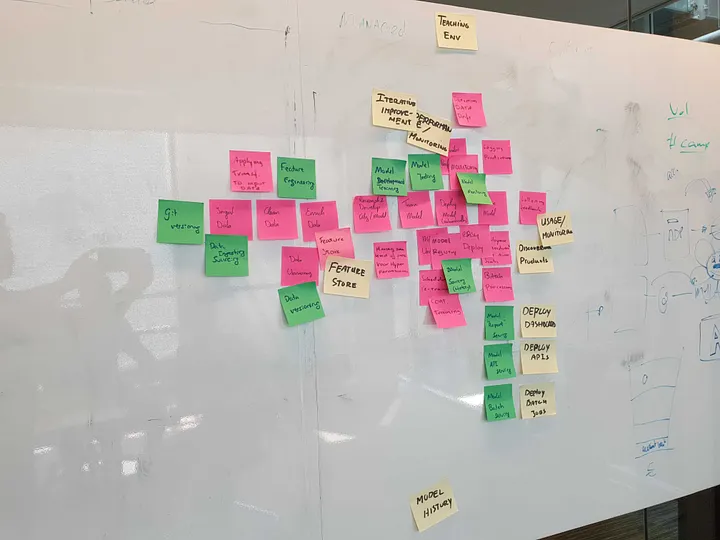
We organised a few brainstorming sessions within our team and interviewed a couple of architects across the org. Slowly but surely, things became more set in stone and less scribbled on a white board in some dark corner on the fifth floor of our office. We wanted to give MLflow another chance and try to keep as much on AWS as possible. After all, it was clear that AWS SageMaker was evolving towards a more mature platform. We were urged by one of the leads of another team to adopt Terraform (or some form of IaC) early on. Since our data engineers were already using Terraform, this became a cornerstone of our platform.
I joined the MLOps community to learn more about the tools and had a couple of conversations with vendors. Started going to meetups. Luckily, we had an AWS enterprise support team also available to help us since we’re a large user of AWS already. Lots of ideas, perhaps too many, started pouring in. The MLOps scene was (still is) a bit of a mess and that is to be expected; what was important for us was moving fast and deciding what the things were that mattered most to us.
We eventually decided that the principles of the platform would be more or less the following:
- Do everything in Terraform, unless we couldn’t.
- Try to adhere to data mesh (which our org adopted in 2021), unless.
- Use managed services where possible, unless.
- Go serverless, unless.
- Avoid Kubernetes for as long as possible.
- Build as we go and migrate old projects when we revisit them.
Model artefacts, experiment tracking, and our first MLOOPS
Despite the intention to migrate only when it was needed, one of the first things we tried was to migrate the MLflow server to AWS Fargate and have the database on AWS RDS, instead of running on the same EC2 instance as the server. Per business unit we decided to host one instance, with separate servers for test and prod. With four BUs, this would mean 4 x 2 almost identical set-ups.
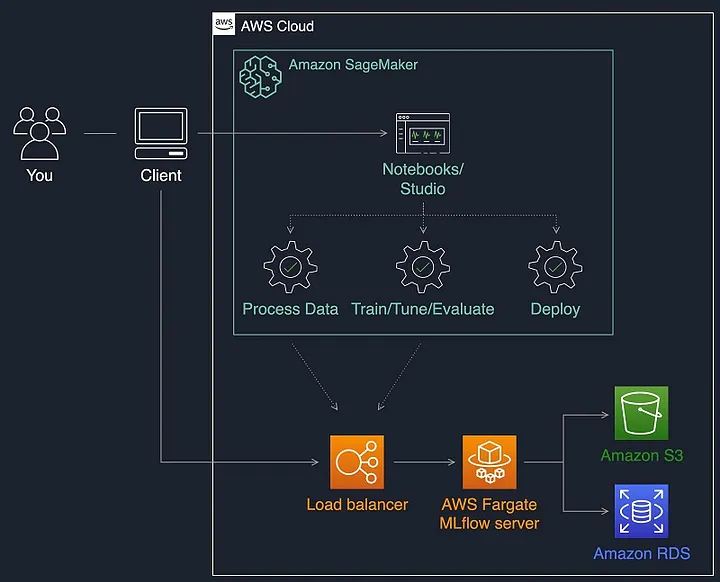
This turned out to be a fairly expensive idea (8 copies of this set-up, all with their own load balancers and databases!) and the amount of projects we were doing didn’t warrant it yet by far. We would later bring this down to two instances. Starting out big like this meant also figuring out Terraform, elastic load balancers, IAM, and Route 53 head on. The learning curve was pretty steep, and a lot of time was spent getting familiar with all the different parts of AWS.
Our first ML-OOPS was trying to set up a ton of (expensive) instances and maintain them, way before they were needed.
For experimentation (AKA Jupyter notebooks) we settled on using AWS SageMaker’s Notebook instances. The notebook instances were supplied with a lifecycle script that would set the correct MLflow URI as an environment variable. We created some scripts to update these in bulk as well as monitor the notebooks themselves, such as throwing an alert in our Slack channels if someone left their instance on outside office hours.
Model deployment and training
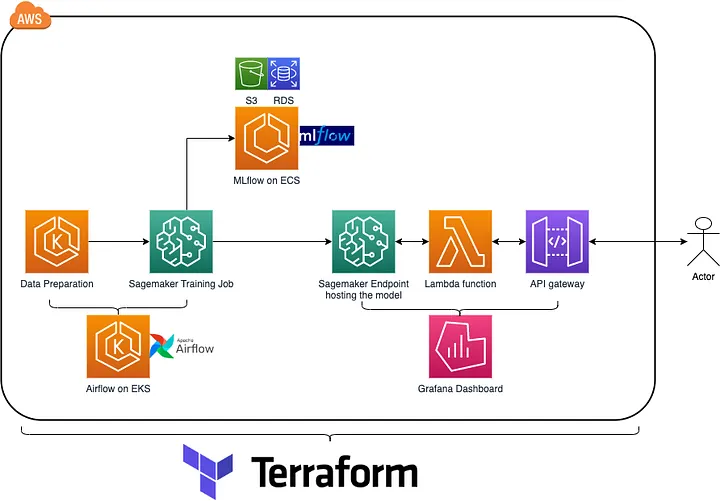
It soon became time to deploy our first models. We used SageMaker’s model endpoints and settled for a Lambda and API Gateway set-up. SageMaker can essentially be a one-stop shop for deployment, although there is a premium you pay over spinning up your own EC2 instances and hosting your own models. It is more expensive than trying to run everything yourself on a Kubernetes cluster you manage yourself. You get a lot back for the premium you pay, though. SageMaker handles various deployment strategies, autoscaling, and allows us to select GPU types when needed.
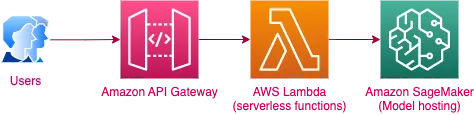
Our models were easily deployed via the SageMaker SDK from both local and cloud environments (e.g. Jupyter notebook or Airflow). The AWS Lambda gave us extra control over in- and output to the model, and the API Gateway provided a RESTful interface that we could use with API keys for our users. Apart from only the model itself, all elements were deployed via Terraform and adding new models was simply adding a Terraform module, mainly specifying a name and where to pull the lambda’s code from. This also meant we could improve the (pre-)processing to the model without changing the SageMaker endpoint, and have CI/CD for the lambdas set up separately.
Training jobs were also delegated to SageMaker. It took considerable effort to create a template for our first few ML training jobs (LSTM models for text categorization made with TensorFlow) and log them to MLflow from inside the training job’s container. We made a generic template for training jobs. SageMaker is fairly opinionated on how it wants to receive training jobs, which means you need to adhere to certain conventions by the platform, even when using TensorFlow. Luckily, under the hood SageMaker’s model serving still uses TensorFlow Extended for TensorFlow models, so there is some intuitive operability with SavedModels.
We orchestrated our training jobs from Airflow, and explicitly did not include retraining on any code merges. Some of our models are fairly expensive, some are not, but almost all have needs for large compute or storage. If needed before scheduled to run, we can simply trigger the DAG and run the pipeline.
Monitoring and alerting
The last item on our AWS shopping list was monitoring and alerting. We first tried out Amazon Managed Prometheus and Amazon Managed Grafana, hoping we could somehow get the data in there that we were seeing in CloudWatch and save on our CloudWatch costs. It turned out this was possible with exporter tools. We set our sights on YACE (yet-another-cloudwatch-exporter) but that had to live somewhere. That somewhere would soon be EC2, and later ECS.
We also had some metrics coming in from one of our business units that we needed to track ourselves. This meant that we needed some kind of interface for them to interact with. This first seemed possible with Managed Prometheus’s Remote Write capability, but we needed more control and were setting up YACE (which was to be scraped every five minutes by Prometheus) anyway. We opted to move YACE and Prometheus to an ECS cluster and set up Remote Write plus a pushgateway to receive metrics from outside our environment. Finally, we did away with Amazon Managed Prometheus.
Unfortunately, YACE did not support all of the AWS services we used. We lacked exporting for SageMaker and were totally in the dark regarding our model endpoints. Luckily the Amazon Managed Grafana instance also pulls stats from CloudWatch, again at a slight premium.
In Amazon Managed Grafana we made a generic dashboard that we converted into a template by taking the JSON model and parameterizing it. Once that was done, we rolled out dashboards for every model via Terraform. Unfortunately, Amazon Managed Grafana demands an API key, for our Terraform and CI/CD to function, which has a max life of 30 days. We set up a key-rotation Lambda to destroy and re-create a key every 29 days and store it in an AWS secret we can request inside our Terraform code. The impact of this is that when deploying a model we could now automatically generate an API, monitoring and logging, and a custom dashboard, within a few seconds.
Since Grafana could also be set to send alerts when metrics pass a certain threshold, this set-up also allows us to trigger alerts upon issues and forward them to Slack or OpsGenie. Since we were still with two, we made an on-call schedule with each of us taking a week of on-call at a time. The trick is never defining an alert with a high priority.
Results
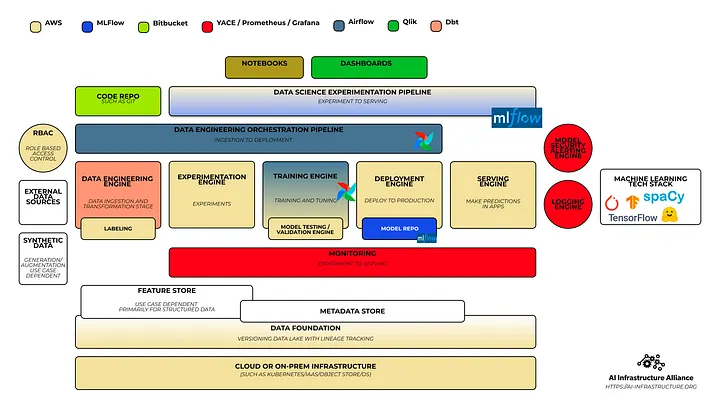
Our resulting “framework” is fairly lightweight and the keen reader will have noticed it doesn’t actually strive to fully automate anything end-to-end. We currently have about 15 models deployed for real-time inference, a year down the line with a team of two. Above is an AWS-centric view of the platform, while the below blueprint, using the template by the AI Infrastructure Alliance, provides an overview of the features of the stack so far.

We wanted to be flexible, and felt that going in with a heavier “do everything for us” framework might be more restricting and more costly. We try to make no strong assumptions. For instance, not every project has fresh data coming in or has access to feedback from production. We might not be allowed to store predictions all the time. Not every model is deployed on SageMaker (some can live in the Lambda perfectly fine!).
Like Lak Lakshmanan’s post (triggeringly titled “No, you don’t need MLOps”) and the now-famous MLOps without much Ops blog series (“You don’t need a bigger boat”), we have a platform that strives to keep things simple.
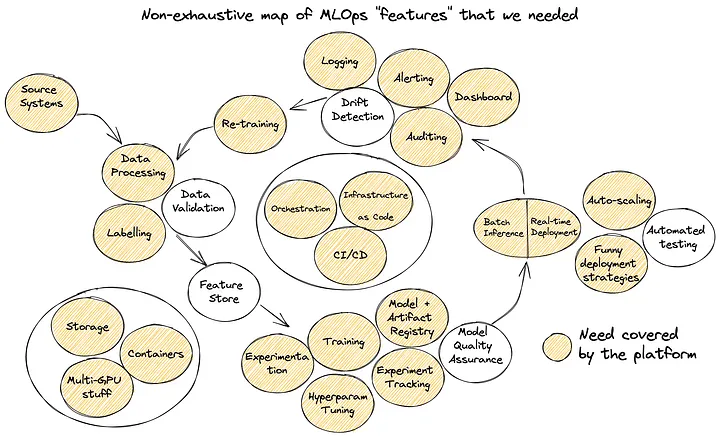
That said, we did have a lot of needs when building the platform. A high-level diagram of the ML lifecycle with our needs mapped out shows we now cover most of them.
Thinking forward
So now we’ve talked a lot about what we’ve built and how it fits into the larger picture. What’s next for us?
The platform still has a blind spot when it comes to testing and validation. We have no formal framework apart from the odd test here and there. It’s relatively hard to build these up front and make sure that you’re not prematurely optimising, especially under pressure. At the same time it’s something we really can’t do without from a software development perspective.
Being a media company, we have models that work on text, images, click streams, graphs, vectors, and tabular data. Some models consume multiple data types. Models can include anything from XGBoost and Random Forests to Transformers and various Recurrent Neural Networks and Convolutional Neural Nets. How could we even hope to build or buy something to test all data types and all models?
Another issue to be addressed is reducing the cold start times for our Lambda functions. Lambda functions are functions as a service that run when invoked. After the first invocation the lambda stays alive for about 15 minutes, unless another invocation follows, up to a max lifespan of about two hours. When allocating the resources and image for the lambda the first time around there is a cold start. Sometimes this is a few seconds, but toss in a TensorFlow import into a Lambda and you shouldn’t be surprised to see your APIs time out.
It’s a fact of life and inherent to using lambdas, but it means that we, or the user of an API, need to have error handling to deal with it if they go on for too long. While it’s recommended to not use lambdas for low volumes of traffic, it’s by far the cheapest option we have and it helps to off-set the cost premium we have for SageMaker. Furthermore, they’re incredibly easy to maintain. Whether the cold start is actually a problem, though, is something that entirely depends on the business context and request volume.
I’m hoping to move away from our self-hosted MLflow at some point. It has no role-based access. This means that every user can see (and delete) every model, and users will need to scroll through potentially hundreds of models in order to find the one they’re looking for. There’s also a cognitive load to using it; any Data Scientist using it will have to actively pay attention to setting their experiment and calling things like mlflow.log or mlflow.autolog. Since we don’t use the option to deploy from MLflow to SageMaker we can switch to one of the many other tools in this niche. We literally only use MLflow as a way to keep track of past model runs.
Closing thoughts
In summary, in this post I’ve gone over our process in creating an MLOps stack that suited our needs. We used AWS services and open-source tools to select a suite of tools to allow us to handle the majority of our use cases. It will continue to evolve over time as our team evolves. Our main takeaways are:
- Go for managed services and don’t look back. If your team is relatively small it’s a great idea to go for managed services so you don’t have the same overhead.
- Get SageMaker. SageMaker is great for small teams and excels in deployment (not updates, but that’s for another time), but it takes a while to get comfortable with it.
- Go with the flow. Airflow and MLflow are great tools in an ML stack because they allow orchestration and ML-bookkeeping, which again allow you to focus on the work that matters most.
- Infrastructure as code is the cloud 10x multiplier. No, seriously. It’s insane how much work Terraform has saved us from doing.
I hope this fully open discussion allows other teams to decide on their stack and evaluate their needs. Hopefully, in the future the platforms and tools we used become more mature and integrate better.
This post benefitted from help by Gido Schoenmacker, Joost de Wit, Kim Sterenborg, and Amine Ben Slama.